Deployment Options
One running KDCube deployment is bound to one effective tenant/project and may serve many apps and concurrent users. The backing Postgres, Redis, object store, and filesystem may be dedicated or shared with other deployments through tenant/project schemas, namespaces, and prefixes.
Deployment mode does not change app surface semantics. An app may ship any combination of APIs, MCP, named-service providers, Data Bus handlers, jobs, widgets, main views, websites, chat, or agents. Internal descriptors still use compatibility names such as bundles.yaml and bundle_id.
The public repository contains the CLI-driven Docker Compose and Kubernetes/Helm paths. KDCube also has an existing Terraform-managed AWS ECS production topology in its private operations repository. That implementation is real but not an open-source install artifact; this page describes its architecture without presenting private modules as downloadable public code.
ECS Topology
Descriptor Release Contract
A release is not only a container image. The six environment descriptors — assembly.yaml, gateway.yaml, economics.yaml, secrets.yaml, bundles.yaml, and bundles.secrets.yaml — carry platform selection, admission policy, economics, app versions, surfaces, named-service registrations, UI sources, feature flags, and secret material or references.
Current public Helm-chart boundary: the maintained chart consumes four overlays directly: assembly.yaml, gateway.yaml, bundles.yaml, and secrets.yaml. It does not currently mount or seed economics.yaml or bundles.secrets.yaml. Operators using that path must provision those two authorities through their deployment-specific economics and app-secret workflow; do not assume the Helm invocation loaded all six families.
App descriptors
bundles.yaml selects app refs, app config, named-service tool policy, scene/shared-source wiring, and frontend-visible namespace style metadata.
Secrets descriptors
bundles.secrets.yaml and secrets.yaml describe app-scoped and platform-scoped secret material. The live authority may be local files, sidecar service, or AWS Secrets Manager.
Environment policy
assembly.yaml selects topology, identity, storage, and providers; gateway.yaml governs admission; economics.yaml defines reservation, pricing, plans, quota, and budget policy.
Discovery and buses
Named-service calls and conversation events carry runtime identity across process boundaries. App-owned Data Bus work remains separate and enters a conversation only through an explicit external_events[] submission.
release.yaml is app release metadata, not runtime configuration. Runtime surfaces, interface declarations, config templates, storage docs, tests, and release metadata should remain synchronized. See Object Ecosystem & Ontologic Contracts for the provider/consumer contract this descriptor layer enables.
Storage Topology
| Storage | Role | Typical deployment |
|---|---|---|
bundle_storage_root() | App filesystem storage. It is not S3. | Local or mounted filesystem; shared EFS in horizontally scaled ECS. |
BundleArtifactStorage | Separate artifact API for produced or hosted artifacts. | Local filesystem or S3-compatible backend. |
| Conversation/workspace storage | User/conversation files, refs, turn artifacts, and isolated-exec workspace lineage. | Deployment storage configured for the runtime. |
| User-scoped secrets | Connected-provider tokens and app/user secret material. | Configured secrets lifecycle; never app metadata files. |
Temporary integration staging is not a distributed object store. Upload and consuming operations must see the same storage root. Provider-owned mail and Slack bytes remain provider-owned until a requested download or materialization occurs.
Collaborative App Preload
Proc workers divide startup preload work with Redis claims keyed by the descriptor-resolved app generation. Claims are heartbeat-renewed; successful work writes a generation-specific done marker. Changing path, module, repo/ref/subdir, singleton flag, or commit produces a new generation.
UI builds are strongly owned process-local tasks and outlive an initiating HTTP request. Source and node_modules stay in worker-local temporary storage; shared storage holds the cross-worker lock, heartbeat, TTL, signature, temporary output, and atomically published artifact. npm/Vite runs in a dedicated process group that is terminated and reaped on timeout or explicit cancellation. Signature publication and lock release happen before expensive local cleanup, so another request or worker sees the completed artifact immediately.
Shared-filesystem locks are still the final guard around widget and main-view artifact writes, especially on EFS. They are not the main work-distribution mechanism. A worker crash stops its heartbeat and lock expiry permits retry. If Redis is unavailable, workers fall back to local traversal protected by those shared-storage locks. Health reports bundles_preload_skipped_claimed and bundles_preload_skipped_done.
Application-Hosted Sites and CDN
Website declarations live under the app's config.ui.main_view.site in bundles.yaml. Valid declarations compile into an immutable ApplicationSiteCatalog. Redis atomically distributes generation snapshots; each proc routes requests from a hot in-memory copy and rejects delayed generations. Redis is not read on every site request.
Direct aliases use /sites/{alias}. For a dedicated hostname, a CDN preserves the viewer host and rewrites clean paths to /api/integrations/site-root/{path}. The CDN forwards and caches responses; it does not own or query the catalog, and OpenResty contains no app/site list.
Monitoring & Observability
The platform exposes operational signals through a combination of log streams, Redis-backed queue metrics, and a health endpoint. These signals are intended for operators monitoring a deployed instance.
These records provide reviewable operational evidence. They are not automatically write-once, tamper-evident compliance records, and the deployment does not acquire a compliance attestation merely by enabling telemetry or a WAF.
Conversation Lanes and Scheduled Work
Conversation event order is defined by Redis lane sequence for one tenant/project/user/conversation/agent identity. Processor queues schedule bodyless lane wakes; they do not define event order. Monitor accepted versus processed lane cursors, wake backlog, active-consumer freshness, event-source owner leases, and background Data Bus/job-stream pending state in addition to aggregate queue depth.
Processor Health
Each processor instance reports liveness through its own container health check. In the private ECS topology, the ALB target group tracks web-proxy; internal chat-ingress and chat-proc use container checks plus ECS/Cloud Map orchestration rather than ALB target membership. Compose likewise uses service-specific container checks.
Log Streams
All platform services emit structured log output to stdout, captured by the container runtime. In ECS deployments logs flow to CloudWatch Logs; in Compose deployments they are available via docker compose logs. Log lines include request IDs, tenant/project scope, internal app id, and error classification where applicable.
Metrics Endpoint
The Operations REST API (served by chat-proc) exposes operational data to authorized callers. App-level turn, economics, and error data can be queried through the app and platform operation surfaces. Use structured container logs and the deployment's log backend for service-level diagnosis.
Proxy Configuration
The OpenResty reverse proxy (web-proxy) sits in front of backend services and handles the deployment's TLS/security-header, auth-cookie, and stable path-routing policy. App-specific surface and site selection stays in proc; no app/site registry is generated into OpenResty.
Request Pipeline
-
1
TLS termination
Unwraps HTTPS, redirects HTTP to HTTPS, blocks direct IP access (returns
444). InjectsHSTS,X-Frame-Options,X-XSS-Protection, andReferrer-Policyheaders. Gzip compression on all text responses. -
2
Rate limiting
Per-IP
limit_reqzones for chat, KB, upload, and auth routes. Runs before auth unmask so DDoS bursts are dropped before burning aproxyloginround-trip. -
3
Auth cookie unmask
For every protected route, an
access_by_luacall tounmask_token()issues an internal subrequest toproxylogin /v1/unmask, extracts real session cookies, and injects them into the upstream request. -
4
Upstream routing
Path-based dispatch to backend services. SSE locations disable buffering with a 600s timeout; WebSocket locations handle protocol upgrade; SPA routes use a 404 fallback.
Upstream Backends
| Backend | Address | Routes |
|---|---|---|
web-ui | web-ui:80 | /chatbot/*, SPA fallback |
proxylogin | proxylogin | /auth/*, internal /auth/unmask |
chat-ingress | chat-ingress:8010 | /sse/, /api/chat/, /api/cb/*, /admin/*, /monitoring |
chat-proc | chat-proc:8020 | /api/integrations/, /admin/integrations/ |
kb | kb:8000 | /api/kb/ |
Rate Limit Zones
| Zone | Rate | Applied To |
|---|---|---|
chat_api_zone | 10 r/s | /api/chat/, /sse/ |
kb_api_zone | 10 r/s | /api/kb/ |
monitoring_api | 10 r/s | /monitoring |
upload | 2 r/s | Upload endpoints |
limit_req zone=chat_api_zone burst=20 nodelay;. For anti-DDoS hardening, add limit_conn zones, timeout hardening, and auth-specific rate zones. See the proxy ops guide for WAF options (lua-resty-waf or ModSecurity + OWASP CRS).Connection Pooling
Redis and Postgres connection pools are created once per worker process during FastAPI lifespan startup and stored in app.state. Total connections scale with worker count.
Redis Pools
| Component | Pools per Worker | Max Connections Formula |
|---|---|---|
ingress / metrics | 3 (async, async_decode, sync) | 3 × redis_max_connections |
proc | 1 (shared async) | redis_max_connections |
Pool size is controlled by GATEWAY_CONFIG_JSON.pools.<component>.redis_max_connections. If unset, the pool is unbounded and grows with load. Pub/sub and blocking calls consume connections from the pool, not on top of the cap.
Postgres Pool
Each worker creates one asyncpg pool. Size is controlled by pools.<component>.pg_pool_max_size and pg_pool_min_size. If not set, it defaults to service_capacity.<component>.concurrent_requests_per_process.
# Total connections per instance
pg_conns_per_instance = workers × pg_pool_max_size
redis_conns_per_instance = workers × pools_per_worker × redis_max_connections
Connection Lifecycle
Shared Redis clients set socket_connect_timeout=5, health_check_interval=30, socket_keepalive=True, and retry_on_timeout=True. A centralized Redis health monitor tracks PING health and emits up/down events. On reconnect, the service automatically rebuilds SSE relay subscriptions and reconnects gateway config pub/sub listeners.
processes_per_instance, total Postgres and Redis connections increase proportionally. Ensure total_pg_connections fits within max_connections on the database and total_redis_connections fits within ElastiCache maxclients.Health Checks
The backend services listed below expose service-specific health endpoints for container and orchestration checks. This is not one universal load-balancer contract: in the private ECS topology only web-proxy belongs to the ALB target group, while ingress and proc are internal services.
Endpoints by Service
| Service | Endpoint | Checks | Readiness |
|---|---|---|---|
| chat-ingress | GET /health | Service up, draining flag, Socket.IO enabled, SSE enabled, instance ID | 200 healthy / 503 draining |
| chat-proc | GET /health | Service state, draining flag, app readiness/errors, collaborative preload skip counters, instance ID | 200 ready / 503 draining or unavailable |
| metrics | GET /health | Service up | 200 healthy |
| kb | GET /api/kb/health | KB stats, orchestrator health, queue stats, storage path | 200 healthy / 503 unavailable |
| kb (process) | GET /api/kb/health/process | Per-process capacity | 200 healthy / 503 unavailable |
Readiness vs Liveness
Health responses expose process and readiness state for orchestrator decisions. A draining instance returns 503 so the load balancer stops sending new work while in-flight work completes. App preload counters distinguish generations skipped because another worker holds the claim from generations skipped because their done marker already exists.
web-proxy; service containers separately check their own verified endpoints, such as ingress/proc/metrics /health and KB /api/kb/health. In Compose, use the matching service-specific endpoint rather than assuming every container implements the same route.Kubernetes Deployment (Helm Charts)
KDCube ships Helm charts for Kubernetes deployment. The maintained local guide covers k3d, k3s, Minikube, and managed EKS; the chart expects a cluster with persistent-volume support and a suitable StorageClass. Other conformant clusters require operator verification rather than an assumed support claim.
Quick Start
# From app/ai-app/deployment/kubernetes/local
k3d cluster create kdcube
kubectl create namespace kdcube

helm upgrade --install postgres-db ./charts/postgres-db \
  -n kdcube -f "$INSTALL_ROOT/descriptors/secrets.yaml"
helm upgrade --install redis ./charts/redis \
  -n kdcube -f "$INSTALL_ROOT/descriptors/secrets.yaml"
helm upgrade --install postgres-setup ./charts/postgres-setup \
  -n kdcube -f "$INSTALL_ROOT/descriptors/assembly.yaml"

helm upgrade --install kdcube-platform ./charts/kdcube-platform \
  -n kdcube \
  -f "$INSTALL_ROOT/descriptors/assembly.yaml" \
  -f "$INSTALL_ROOT/descriptors/gateway.yaml" \
  -f "$INSTALL_ROOT/descriptors/bundles.yaml" \
  -f "$INSTALL_ROOT/descriptors/secrets.yaml"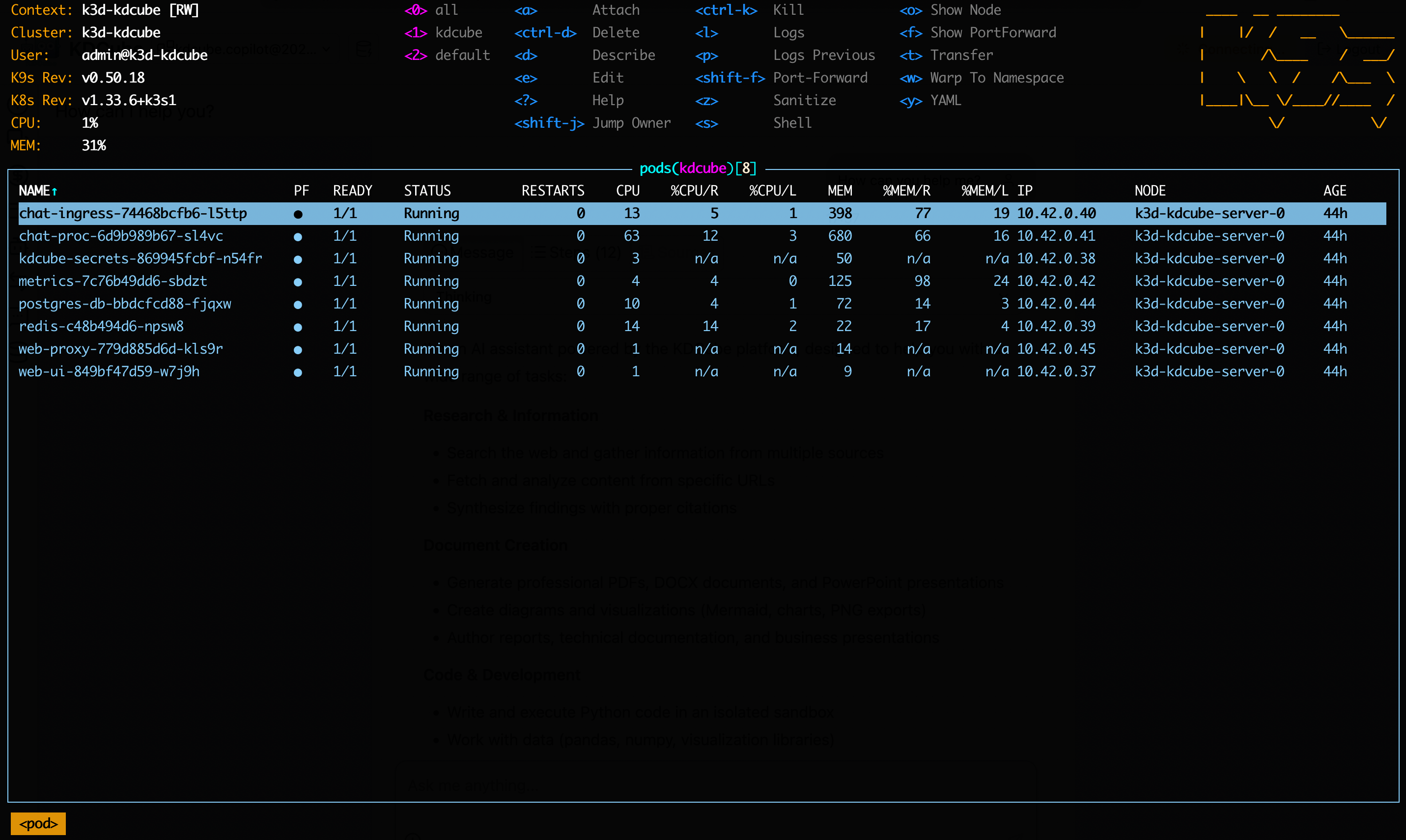
What Gets Installed
The recommended flow is descriptor-driven: keep environment-specific configuration in descriptors/*.yaml, install infrastructure charts first, then install the platform chart with its four currently supported overlays. The general six-descriptor platform contract remains broader than this chart's present input set.
Infrastructure charts
charts/postgres-db— PostgreSQL with pgvectorcharts/redis— Redis with password authcharts/postgres-setup— one-shot schema/bootstrap job
Platform chart (kdcube-platform)
kdcube-secrets— secrets managerchat-ingress— API gatewaychat-proc— agent processormetrics— metrics aggregationweb-ui— chat web appweb-proxy— Nginx reverse proxy
PersistentVolumeClaims
The platform chart creates five PVCs by default: bundles, kdcube-storage, bundle-storage, exec-workspace, and kdcube-logs.
Full reference: kubernetes/local on GitHub.