KDCube ReAct Agent
KDCube ReAct is the built-in, configurable agent for production apps. It consumes the framework-neutral Agent Harness Runtime and adds a timeline-first decision loop, semantic-channel protocol, round governance, tools, skills, web and knowledge search, logical workspaces, isolated code execution, named services, event-aware turns, files, plans, user-selectable capabilities, and subagents. Apps can use it as supplied or host another agent framework as a sibling harness consumer behind the same KDCube serving boundaries.
ReAct v3 is one autonomous bounded loop. Planning is a tool the agent can invoke, not a separate coordinator. Multi-action behavior is governed by tool metadata: strategy classifies ordered causality, while execution can start a fully validated, exactly-neutral, detached call after its streamed action closes. Unknown tools remain callable but run alone.
ReAct is not built around provider-native tool calling as its model contract. The runtime reads its own semantic channels while the model streams, so reasoning, decisions, raw code, and event blocks do not have to be squeezed into an assistant/tool/result envelope. Code can be written freely instead of escaped inside JSON, reducing failures for programs containing quotes, HTML, or nested JSON and allowing models without a provider-specific tool-calling format to act as the decision model.
tool_call_complete + parallel_with_generation + detached + at_most_once_per_round. It runs only after ordinary overseer, decision, protocol, and parameter-signature validation, and the current executor additionally requires strategy=neutral. Post-generation processing counts that action but does not validate, write, or execute it again. Round-level retry deduplication is not process-global exactly-once delivery.
PlanSnapshot that is tracked as a react.plan block in the timeline. On subsequent rounds the agent can update step statuses (✓ done, ✗ failed, … in-progress). This is all within the same loop — no coordinator needed, and no cache miss from a different system prompt.
react.delegate. It is not an in-turn micro-agent and not the fenced runtime used for isolated execution.
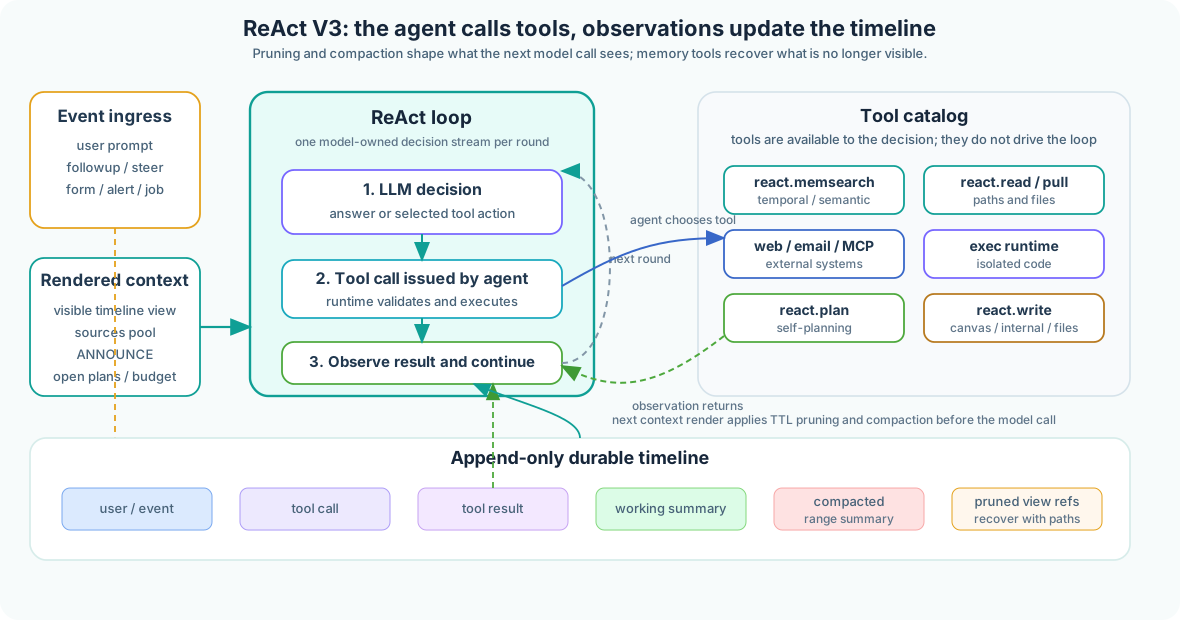
ReAct V3 Agent — Detailed Loop & Tool Integration
What the Agent Sees Each Round
Every decision round is rendered from durable runtime state into one model-facing context. Old conversation memory appears first, the active turn stays readable, and ANNOUNCE stays in the uncached tail.
[COMPACTED PRIOR CONVERSATION MEMORY]   # if older raw turns were compacted
PRUNED PRIOR TURNS                      # working summaries or retrieval rows
RECENT INTACT TURNS                     # newest turns rendered normally
CURRENT TURN                            # current user input, rounds, tools, files
SOURCES POOL                            # citation/source inventory
ANNOUNCE                                # uncached live operating state for this round
ANNOUNCE is a fresh status briefing, not a notification to the user and not another tool. It tells the model what is true now: remaining budget, workspace map, open plans, live conversation events, previously demanded consent transitions, reactivated tools, cache status, and delegations. Claim-gated configured tools remain in the catalog; an unmet connected-account claim is not converted into a turn-start [INACTIVE TOOLS THIS TURN] list. Durable teaching stays in the cacheable system instruction, while changing turn-local facts stay here so the agent does not act on stale state.
The model replies through runtime-owned channels. ReactDecisionOutV2 carries one action per channel instance: call, complete, or exit. Repeated action channels can express multiple actions, and the runtime validates them against strategy and execution policy. Other channels can carry reasoning, raw code, summaries, canvas content, or subsystem data. ReAct also consumes event blocks that describe things the agent did not initiate, which a conventional tool-call transcript cannot express cleanly.
User-Saved Capabilities
The app administrator grants an inventory per agent: models, tool groups and tools, skills, MCP servers and tools, named-service realms and operations or actions, and helper-agent availability. That inventory is the capability ceiling; a user can narrow it but cannot widen it. Chat keeps picker edits local until Save changes; sending a message does not save them implicitly.
The saved selection is scoped to (user, app, conversation, agent). A new conversation copies the optional user/app/agent baseline once, otherwise it starts from app configuration. Instruction profiles are also selected by ID per conversation; their prompt content stays inside the app contract. Profiles may reference the full, lite, or serving-constrained extra-lite blocks through IDs such as xlite:workspace_exec. Model, instruction, tool, skill, MCP, namespace, operation/action, or subagent changes alter the stable system block and make the whole prompt cold for one applicable turn. ANNOUNCE-only changes do not invalidate that stable prefix. The policies are accept, confirm (the default), defer_cold, and defer_conversation.
Subagents and Delegation
Subagents are offered into a turn only when both administrator configuration and the conversation-scoped user selection allow them. Denial prevents spawner installation, react.delegate, and delegation guidance. When installed, react.delegate launches a self-contained charter in a child conversation whose turns are fair-scheduled, then returns immediately. The charter is a plain string. The agent chooses a configured alias such as fast_agent or strong_agent, never a raw model ID, and may give the helper an agent_title.
The child uses react.contribute to report milestones and refs. Contributions fold into a live parent turn; convergence or failure can wake a continuation when no parent turn is active. Visibility defaults to silent, while thread renders the child's stream as a named collapsible participant. Helper spend is attributed to the child and rolled up under the delegating turn.
Creating and Running the ReAct Agent
A fresh ReAct runtime object is constructed for every accepted turn, but ReAct is not stateless. Construction combines four inputs: app code invoking build_react, the administrator inventory, the conversation-scoped user selection, and durable turn state such as timeline blocks, workspace refs, memory, runtime context, and event-lane state.
accepted turn
  -> resolve tool inventory, traits, claims, MCP, and named services
  -> resolve skills
  -> apply conversation-scoped user selection
  -> refresh previously demanded consent transitions
  -> compose stable teaching, catalogs, and service roster
  -> build_react(...), event-source specs, optional subagent spawner
  -> react.run(...)
  -> fence and dispatch each concrete attempted operation
Turn-start consent processing is transition bookkeeping, not a second inventory-narrowing pass and not the security boundary. A bookkeeping failure preserves the configured inventory; each attempted operation is still checked by its concrete authorization and claim fences.
The app descriptor grants each agent its tools and skills. The workflow resolves that inventory for the current agent_id, applies the user's saved narrowing, and passes the effective specs into the construction path:
# In a BaseWorkflow subclass
from kdcube_ai_app.apps.chat.sdk.runtime.tool_config import agent_tool_config_from_bundle_props
from kdcube_ai_app.apps.chat.sdk.runtime.skill_config import agent_skill_config_from_bundle_props

client_id = self.runtime_ctx.agent_id
tools = agent_tool_config_from_bundle_props(
    self.bundle_props, client_id, bundle_root=self.bundle_root()
)
skills = agent_skill_config_from_bundle_props(
    self.bundle_props, client_id, bundle_root=self.bundle_root()
)
tools, skills = await self.apply_user_agent_selection(tools, skills)
tools = await self.apply_delegated_tool_claims(tools)

react = self.build_react(
    scratchpad=scratchpad,
    mod_tools_spec=tools.tool_specs,
    mcp_tools_spec=tools.mcp_tool_specs,
    tools_runtime=tools.tool_runtime,
    tool_traits=tools.tool_traits,
    custom_skills_root=skills.custom_skills_root,
    skills_visibility_agents_config=skills.agents_config,
)
result = await react.run()
Timeline
The ordered timeline is a shared Agent Harness contract, not a ReAct-owned persistence model. sdk/runtime/harness/timeline owns event identity, the persisted conv.timeline.v1 payload, TurnLog, client turn views, and ownership-fenced provider projection. solutions/react/timeline.py is the ReAct adapter over those contracts. A separate source pool tracks sources referenced in the conversation; the timeline payload carries current source rows so react.read and exec fetch_ctx can recover fetched web content.
It is also a live event surface while a turn runs. Follow-up, steer, connected-account grants, subagent reports, and other inputs enter the ordered lane for the current tenant/project/user/conversation/agent. If the active ReAct turn owns the fenced listener, it folds accepted events at safe boundaries; the app entrypoint is not invoked again for every arrival. Event consumption is total, the processed cursor advances even when an event renders no timeline block, and the close gate waits until that cursor covers the latest accepted event.
Conversation-owned refs are qualified at birth. The outer owner/family prefix and the physical conversation body are different: conv:ar:conv_<conversation_id>.turn_<turn_id>.assistant.completion. Do not rewrite conv_<conversation_id> into conv:. Earlier visible completions use numbered suffixes, and external-event records use the same qualified conversation and turn lineage.
When context compaction actually starts or completes, the runtime emits chat.compaction on the dedicated chat_compaction transport route. Browser clients and adapters such as Telegram can append this as a short progress item while the same ReAct turn continues running.
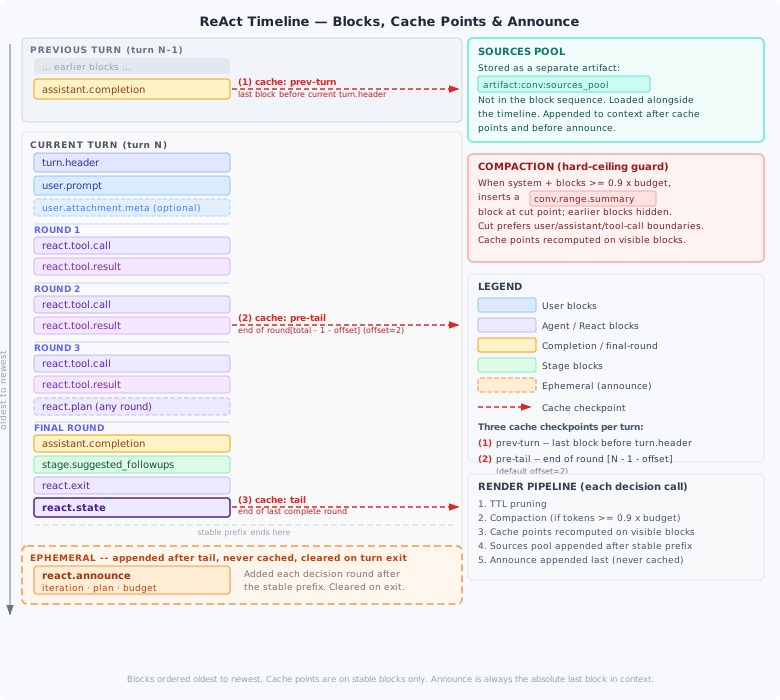
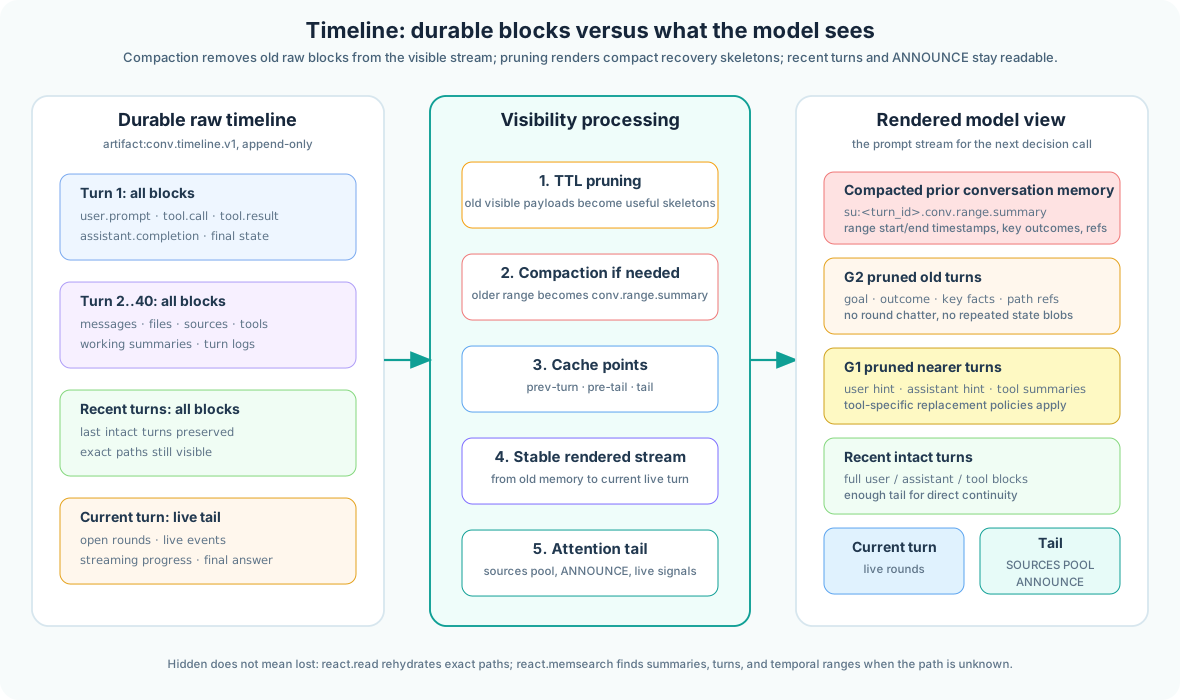
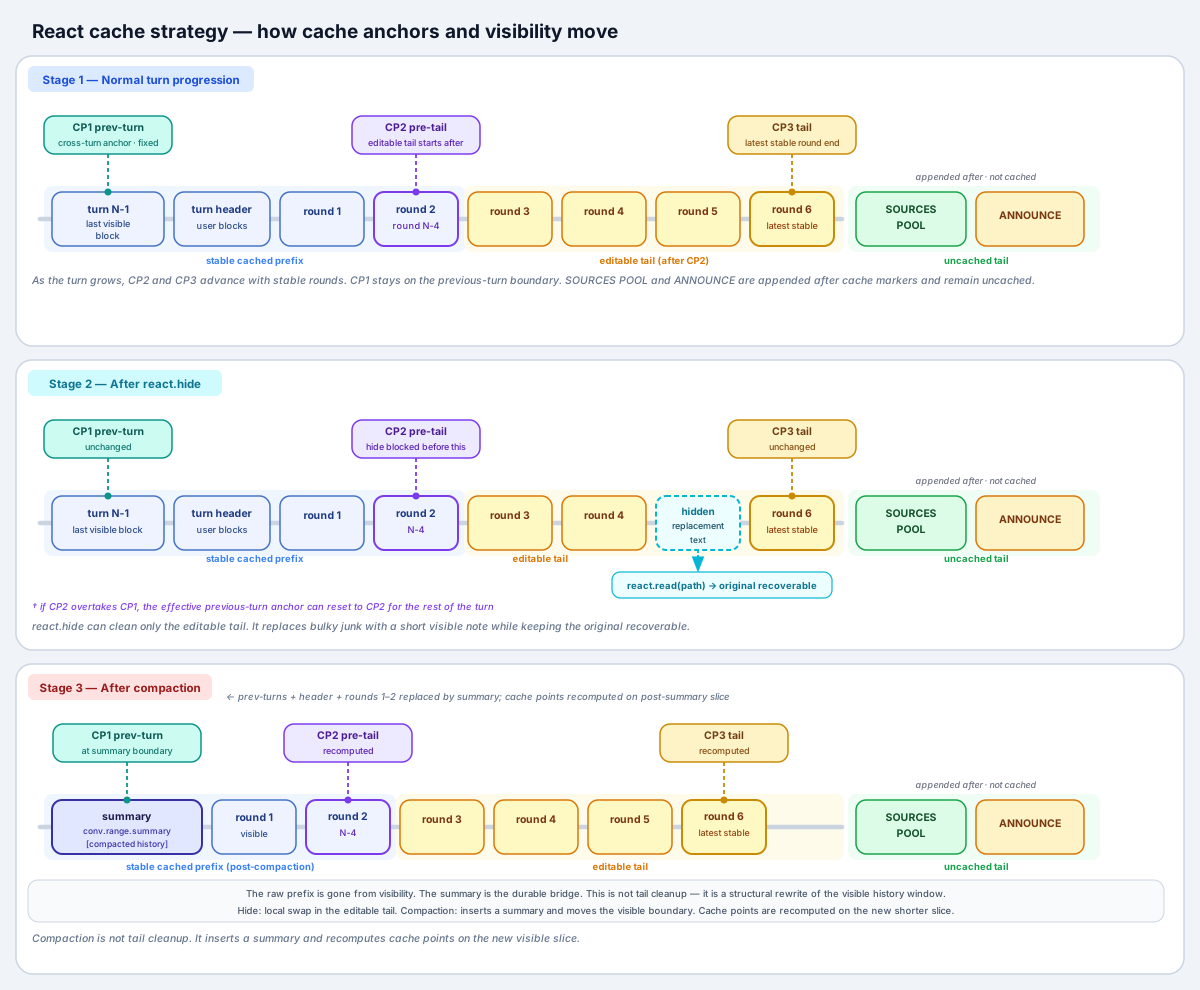
Cache checkpoints are computed by rounds (tool call rounds + final completion). They allow LLM context caching to skip retokenizing earlier parts of long conversations. See timeline-README.md, source-pool-README.md, and context-caching-README.md.
Pruning, Compaction, and Recovery
TTL pruning and hard compaction do different jobs. TTL pruning keeps the cache useful by replacing older visible blocks with compact recovery rows. Hard compaction is the context-window safety valve: it summarizes an older range under a qualified conv:su:conv_...turn_... ref and removes the compacted raw blocks from the visible stream. Neither process deletes artifacts, tool logs, turn logs, or source rows. The visible text becomes a map; logical paths remain the handles for exact recovery. Compaction lifecycle is visible to clients through chat_compaction stream events.
| Layer | Visible Shape | Recovery Route |
|---|---|---|
| Working summary | conv:ws:conv_...turn_....conv.working.summary with goal, outcome, facts, refs | react.read(paths=[ws_path]), then read exact refs |
| TTL-pruned turn | compact turn data rows or summary cards, not full old chatter | react.read(paths=[ar/tc/fi/so path]) |
| Compacted range | [COMPACTED PRIOR CONVERSATION MEMORY] checkpoint | react.memsearch or paths carried by the summary |
| Exact file | conv:fi: logical file path | react.pull(paths=[fi_path]) when code needs a local file |
Multi-Channel Streaming
react.memsearch, and is not shown as user-facing assistant text.
These are runtime-defined channels, not tool-call arguments. ReAct can stream raw code, thinking, decision JSON, and widget/subsystem payloads independently instead of forcing generation into a provider-native tool-calling format. Repeated declared channels are handled as repeated channel instances, and raw code is kept isolated even when generated HTML/JS contains backticks.
This is what enables live-updating widget dashboards while the agent is still running.
When those dashboards are part of an app, they remain normal app UI surfaces served by KDCube. A client shell may embed them, but iframe embedding is outside the ReAct protocol and outside the app surface model.
See channeled-streamer-README.md and streaming-widget-README.md.
Online Round Governance
ReAct v3 validates a decision round in two tiers. First, ReactDecisionPrefixGuard observes raw provider deltas before generic channel parsing. Leading whitespace is allowed, but the first completed channel tag must be <channel:thinking>. Invalid leading prose is rejected as soon as it can no longer form a valid prefix; a wrong first channel is rejected when its opening tag completes. StreamPolicyViolation cancels generation before channel subscribers, the action overseer, or early tool execution can observe the rejected response. The generic channel streamer stays protocol-neutral: this prefix rule belongs to ReAct.
For an accepted stream, RoundActionOverseer is the online Tier 1 gate. It governs each action lane using ordered strategy compatibility (exploration, exploitation, neutral, or unknown) and execution traits, with a stricter rule for final-answer lanes. Complete-response shape, parser, and schema checks form Tier 2 defense after streaming.
The decision packet carries per-lane streamed_state, including answer_streamed, answer_text, and lane facts recorded by the actual stream gates. Thinking or progress is not a delivered final answer. If and only if a final answer was already delivered and Tier 2 later rejects that completion lineage, keep-and-stop finalizes with the delivered text instead of retrying and duplicating it. A policy-rejected prefix has no answer lane to salvage. Corrective feedback is persisted as a self-sufficient react.notice with its structured diagnosis; rejected raw content is not replayed into the model. The schema-error-retry form of react.decision.raw is debug-only, while a genuinely steer-interrupted raw decision with meta.interrupted=true remains an always-rendered timeline fact.
Built-In React Tool Surface
The built-in react.* tools are control-plane tools for the loop itself. App tools, MCP tools, web/email tools, named-service tools, and isolated exec tools sit beside them, but these are the primitives the agent uses to manage memory, files, plans, object refs, and context size.
Large initial tool results are prompt-capped before the next decision round: the full conv:tc: result remains stored, while the model sees a bounded preview with size metadata, a depth-limited shape, and recovery instructions for react.read or exec ctx_tools.fetch_ctx.
| Tool | Purpose | Typical Use |
|---|---|---|
react.read | Reopen logical paths and exact ranges | Read conv:ar:, conv:tc:, conv:fi:, conv:so:, conv:ws:, conv:su:, sk:, or ks: refs. Large text returns a configured bounded preview by default. For large text files, pass items=[{path,line_start,line_count}] from react.rg to materialize line-numbered ranges. Text previews report fully visible lines as [start-end]/total; a mid-line cut is marked separately. max_text_symbols requests a smaller explicit preview, and stats_only returns metadata without content. PDF/image payloads are attached whole only when under the raw byte cap. |
react.rg | Find local files and text regions | Search only already-materialized workspace paths such as git/projects/..., files/..., git/snapshots/..., attachments/..., external/..., or their turn-qualified physical forms. It does not search unpulled logical refs or the conversation timeline. Returned read_item ranges can be passed to react.read. |
react.memsearch | Search prior conversation memory | Find summaries by topic, ordinal turn, or time window |
react.pull | Materialize refs into the local artifact workspace | Bring same-turn, older-turn, cross-conversation, or registered namespace refs onto the current worker as local reference material. conv:fi:... refs map by convention; named-service refs such as mem:record:... or task:issue:... are resolved through provider discovery, and the pull result tells the agent the materialized conv:fi: path while preserving meta.object_ref. |
react.checkout | Rebuild an editable workspace | Copy selected historical conv:fi:conv_...turn_....git/projects/... refs into turn_<current>/git/projects/.... It is for editable project state, not produced files, snapshots, attachments, or custom namespace refs. |
react.write / react.patch | Create or edit current-turn text artifacts | Write Markdown, HTML, JSON, notes, or internal files, and patch current workspace files. Text previews may be line-numbered for reading; those prefixes are display-only and must never be generated in patch or replacement content. channel="internal" creates an internal file by default; add scratchpad=true only for short inline react.note anchors. |
react.plan | Manage open plans | Create, replace, activate, close, and update step state |
react.hide | Shrink visible tail blocks | Replace bulky but recoverable content with a short placeholder |
Visible read limits are unit-specific and apply per requested path: text previews use text-character and token caps; all payloads use a raw byte cap. Unsupported binaries remain metadata-only and should be inspected through exec or related text/source refs.
Named-Service Tools and Search Scopes
Named-service tools give the agent one ontologic interface for many object systems. The tool catalog lists configured base namespaces and provider-declared search scopes. For example, a provider can expose a base namespace for policy and scoped search object spaces for records, attachments, issues, or another object kind. The agent calls the same named_services.search_objects, object_schema, upsert_object, and delete_object shapes instead of learning a new tool family for every subsystem.
Action payloads are provider-encoded; no general pattern predicts their keys. Before the first action on a namespace in a turn, ReAct reads object_schema (or provider_about when no schema is served), uses only declared keys, and verifies the result echo after a state-changing action.
Authorization is operation-specific and direction matters. Delegated by KDCube admits a hosted agent, external OAuth client, or manual automation bearer into a configured KDCube resource; Delegated to KDCube is the user's connected provider account. Every hosted agent has the deterministic client identity kdcube-agent:<application>:<agent_id>, so granting one agent grants nothing to its siblings.
For a provider-backed per-account operation, capability is resolved before caller binding. Missing provider connection or provider scope yields connect_required, claim_upgrade_required, or reconnect_required and routes to Delegated to KDCube. Once that prerequisite exists, missing caller-to-account authority yields agent_grant_required and routes to Delegated by KDCube. Either consent can later be revoked and every operation fails closed against current server-side grants.
Missing consent is detected when the concrete operation is attempted, not by a turn-start union of possible claims. The caller-side middleware emits the scoped chat demand because a provider app may execute without a chat lane. Successful approval records connections.consent.granted in the conversation so a later round can continue with the fact. Sequential demand approvals merge into the existing per-agent resource grant; an explicit Connection Hub edit may narrow or replace it.
When search returns objects, the runtime can emit a structured search-results event for capable clients. The model receives the normal tool response, while the UI can render clickable and draggable result items as context pins.
Object Pull, Read, and Render Policies
named_services.search_objects(namespace="mem", query="legal authoring")
  -> returns refs such as mem:record:...

react.pull(paths=["mem:record:..."])
  -> provider object.get materializes conv:fi:conv_...turn_...files/materialized/mem_123.json
  -> artifact meta.object_ref = mem:record:...

react.read(items=[{"path":"conv:fi:conv_...turn_...files/materialized/mem_123.json"}])
  -> namespace block production turns raw object JSON into model-readable blocks
  -> optional block.render can patch provider-owned blocks during timeline projection
The object ref remains the identity anchor. Block production and rendering policies are selected from that ref, not from a guessed file path. This lets memory records, task issues, attachments, canvas objects, and future namespaces provide their own readable projection without adding bespoke ReAct tools.
Tool Lifecycle Events
ReAct emits UI-visible lifecycle events for proposed tool calls, executed calls, results, errors, and rejected protocol actions. This powers a truthful Steps view and gives future clients a stable trigger surface for observability and workflow automation.
Workspace Artifact Namespaces
The shared agent harness separates artifact origin from current editable workspace state. Current-turn project files live under turn_<current>/git/projects/.... Produced reports, render sources, screenshots, PDFs, and diagnostics live under turn_<current>/files/.... Story or workflow state snapshots live under turn_<current>/git/snapshots/.... User uploads and externally rehosted attachments live under attachments/... or external/....
conv:fi:conv_conversation-42.turn_111.git/projects/app/src/main.py
  -> turn_111/git/projects/app/src/main.py

conv:fi:conv_conversation-42.turn_222.git/snapshots/wizard/current.yaml
  -> conv_conversation-42/turn_222/git/snapshots/wizard/current.yaml

ext:inventory/reorder_42/stock-snapshot.yaml
  -> a framework adapter such as react.pull calls the app-registered resolver
  -> use the returned materialized conv:fi: path
Custom namespace refs are intentionally opaque: an agent must not invent a matching conv:fi: path. An app or loaded event/tool module registers a resolver or materializer, and a compatible framework adapter converts the owner ref into normal harness artifact space. react.pull is the ReAct adapter for this shared contract.
ReAct V3 Agent Documentation
ReAct adapter docs live in docs/sdk/agents/react/; framework-neutral event, timeline, and workspace contracts live in docs/runtime/harness/. Key files:
Shared Agent Harness
Architecture & Flow
Timeline & Artifacts
- timeline-README.md — blocks, cache points, compaction
- context-caching-README.md — cache checkpoints, TTL pruning, hide
- compaction-README.md — hard ceiling and compacted memory
- round-generation-feedback-README.md — online guards, streamed state, and corrective notices
- source-pool-README.md
- artifact-discovery-README.md
Tools & Execution
- react-tools-README.md — built-in
react.*tools - memory-recovery-path-README.md — memsearch, read, turn index
- external-exec-README.md
- tool-call-blocks-README.md
- event-blocks-README.md
Plan Tracking
Plans are a first-class timeline concept, not a separate orchestration layer. The agent creates and manages plans through the react.plan tool, and every plan is persisted as an append-only sequence of react.plan snapshot blocks in the timeline.
PlanSnapshot Structure
Each plan snapshot is stored as a timeline block of type react.plan with a stable plan_id and ordered steps. Key fields:
| Field | Description |
|---|---|
plan_id | Stable identifier for the plan lineage (opaque string) |
steps | Ordered list of step descriptions |
status | Current plan status |
origin_turn_id | Turn where the plan was first created |
last_turn_id | Turn of the most recent update |
closed_ts / superseded_ts | Terminal timestamps (set when plan is closed or replaced) |
The react.plan Tool
The agent manages plans through four lifecycle modes:
mode="new"
Creates a fresh plan lineage with a new plan_id and ordered steps. Becomes the current plan immediately and appears in ANNOUNCE.
mode="replace"
Retires an existing plan (marks it superseded) and creates a new lineage as its replacement. The old plan disappears from the open-plans view.
mode="activate"
Re-activates an older open plan as the current plan. Does not create a new plan_id. Progress acknowledgements apply only to the current plan.
mode="close"
Terminates a plan without replacement. The lineage stays in history but disappears from ANNOUNCE.
Plan Block in Timeline
Plans appear in the timeline as react.plan blocks with a stable reread handle:
# Stable latest-snapshot alias for any plan lineage
conv:ar:plan.latest:<plan_id>

# Model creates a plan
react.plan(mode="new", steps=["collect metrics", "compare trends", "draft answer"])

# ANNOUNCE shows open plans with step markers
# [OPEN PLANS]
#   plan_id=plan_alpha (current)
#     □ [1] collect metrics
#     □ [2] compare trends
#     □ [3] draft answer
Step Statuses
The agent reports step progress via notes using status markers. The runtime parses these markers and updates the plan snapshot automatically.
| Marker | Status | Meaning |
|---|---|---|
✓ [n] | Done | Step completed successfully |
✗ [n] | Failed | Step failed or was abandoned |
… [n] | In-progress | Step is currently being worked on |
□ [n] | Pending | Step not yet started (default) |
react.plan(mode="activate"|"replace"|"close"), it should acknowledge progress in a later round, not the same one.
Multi-Round Plan Tracking
Plans survive across rounds and turns through the following mechanisms:
- ANNOUNCE lists the last 4 open plans each round, marking the current one explicitly with
(current). - The stable alias
conv:ar:plan.latest:<plan_id>always resolves to the newest snapshot for a lineage, regardless of which turn last updated it. - On a new turn, the runtime rehydrates only the current open plan automatically. Older plans must be inspected explicitly via
react.readif they become relevant again. - When history is compacted, older plans appear in a
react.plan.historyblock with step skeletons, statuses, and stablesnapshot_refs for recovery.
A plan lineage is considered open only if its latest snapshot is not closed, superseded, or complete. Only the plan tagged (current) in ANNOUNCE may receive step acknowledgements.
See plan-README.md
Isolated Execution Runtime
The platform provides a reusable generated-code execution runtime: an agent can generate Python, execute it under a selected profile, call governed tools, and receive a normalized result envelope. ReAct uses it directly, and other agents such as a hosted LangGraph solution can expose the same execution service as a tool. The security boundary depends on the selected profile; “isolated execution” is not one universal guarantee.
- Supervisor — the trusted side of supervised profiles, carrying request identity, tool registry, policy context, and required service clients. Python, MCP, app-local, and named-service tool calls from generated code execute here.
- Executor — the untrusted generated-code side. In the reference Docker split profile it is a separate networkless, read-only-root container with only execution-scoped work, artifact, log, and supervisor-socket mounts.
| Profile | Physical boundary | Correct use |
|---|---|---|
| Local subprocess | Separate process on the processor host; inherits host environment and network; no supervisor/executor split | Development-time process and crash containment, not a secret or network sandbox |
| Docker split Reference | Trusted supervisor and separate networkless executor containers; narrow mounts; no platform secret store in the executor | Strongest built-in profile for untrusted generated code |
| Docker combined Legacy | Supervisor and UID-dropped child share one container and mount namespace; child env is filtered and its network namespace is removed | Accepted compatibility profile, not a separate filesystem boundary |
| AWS Fargate exec | One remote ECS task/container runs the supervisor plus executor child; S3 moves workspace snapshots; task and child network controls apply | Remote or longer-running work where task startup and snapshot transport are acceptable; not equivalent to local Docker split |
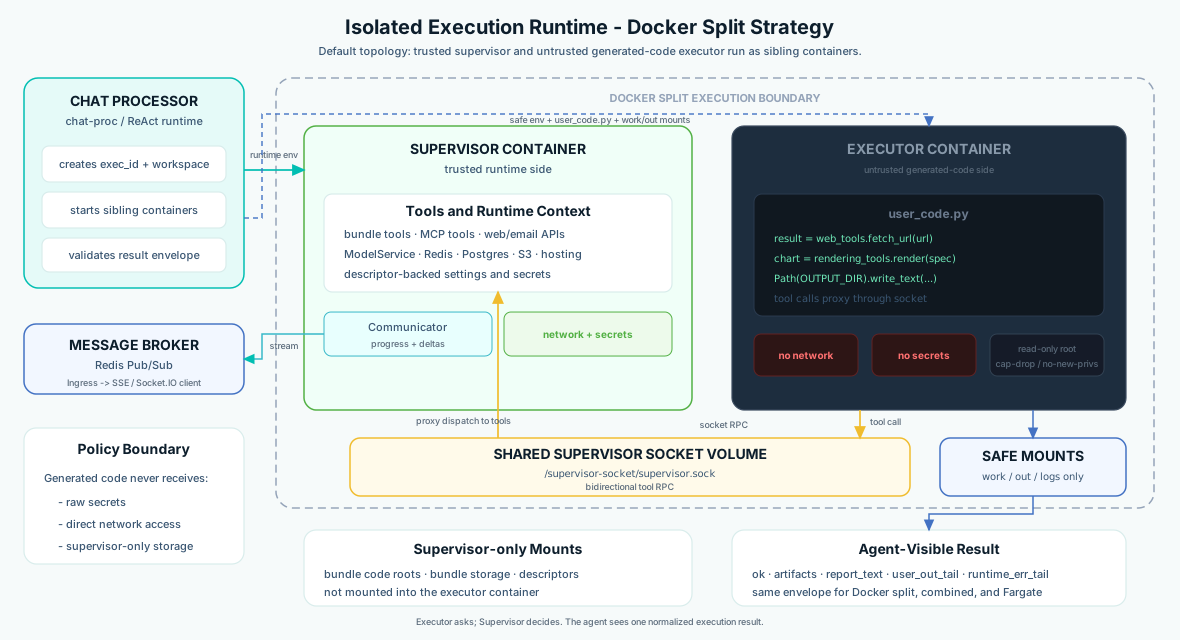
The checked-in reference deployment selects Docker split for untrusted generated code. A deployment or app may define multiple named profiles and choose one deliberately; that choice must remain visible in every security claim.
Executor Environment Variables (Generated Code)
| Variable | Description |
|---|---|
WORKDIR | Working directory (source, helpers) |
OUTPUT_DIR | Output directory (write files here) |
EXECUTION_ID | Unique execution identifier |
AGENT_IO_CONTEXT | Limited tool-proxy context for Unix socket calls |
Supervisor launch env is different from generated-code env. Docker receives the exec launch payload inline as RUNTIME_GLOBALS_JSON. Fargate receives KDCUBE_EXEC_PAYLOAD_SECRET_ID, an AWS Secrets Manager secret name for temporary launch JSON; the entrypoint calls GetSecretValue, parses the JSON, and restores RUNTIME_GLOBALS_JSON, RUNTIME_TOOL_MODULES, and packaged supervisor env before bootstrap. The supervisor also receives descriptor payloads such as KDCUBE_RUNTIME_ASSEMBLY_YAML_B64, KDCUBE_RUNTIME_BUNDLES_YAML_B64, KDCUBE_RUNTIME_GATEWAY_YAML_B64, KDCUBE_RUNTIME_SECRETS_YAML_B64, and KDCUBE_RUNTIME_BUNDLES_SECRETS_YAML_B64. It materializes those descriptors before tool bootstrap so bundle tools can use normal get_settings(), get_plain(), get_secret(...), bundle props, and get_secret("b:...") bundle-secret lookups. By default descriptor payloads are full; setting execution.runtime.descriptor_payload_scope: active_bundle filters only bundles.yaml and bundles.secrets.yaml to the active caller bundle.
Supervisor vs Executor Architecture
Supervised profiles use one logical tool-broker contract but provide different physical boundaries. In Docker combined, supervisor and generated-code child share one py-code-exec container. In Docker split, they are sibling containers. In Fargate, they run inside one remote task/container. Local subprocess has no privileged supervisor boundary.
- The Supervisor bootstraps the full runtime: loads dynamic tool modules, initializes ModelService, KB client, Redis communication, and starts a
PrivilegedSupervisorlistening on the supervisor socket. - The generated-code child drops privileges to UID 1001 in supervised container profiles and runs
user_code.py. Its mount, environment, and network guarantees depend on the profile. - Tool calls from generated code (
io_tools,web_tools,react_tools, and configured app tools) cross the Unix socket to the supervisor. The generated program supplies the operation arguments; the trusted side supplies identity and credentials and enforces the concrete call.
Docker Execution Mode
split strategy keeps supervisor-only app mounts and descriptor material out of the executor container; combined does not.
# App profile override
config:
  execution:
    runtime:
      mode: "docker"
      container_strategy: "split"
Fargate Execution Mode
Fargate exec preserves the supervisor/tool-broker contract on a dedicated ECS Fargate task, but the current implementation runs the supervisor and executor child in one remote task/container. It replaces Docker-on-node where the processor cannot access a Docker daemon; it is not the same physical boundary as local Docker split.
| Aspect | Docker Mode | Fargate Mode |
|---|---|---|
| Startup latency | Sub-second | 10-30 seconds |
| Workdir sharing | Host bind mount | S3 snapshot + restore |
| Network isolation | Split executor has no network; combined uses a child network namespace | Task-level VPC security group plus executor-child network isolation |
| Task lifetime | Container exits, docker rm | ECS task STOPPED |
| Caller waits via | proc.communicate() | Poll describe_tasks until STOPPED |
| Best for | Interactive agentic loops | Batch workloads, heavy computation |
The caller (chat-proc) snapshots the workdir and outdir to S3, launches the Fargate task via ecs.run_task, polls until completion, then restores output zips back to the local workspace. From the agent's perspective, the result contract is identical to Docker mode.
Environment Variable Injection
The Fargate task receives supervisor launch state through containerOverrides.environment at run_task time. The current Fargate path stores the exec launch payload in AWS Secrets Manager under a name like kdcube/runtime/exec-payloads/<exec_id> and passes that name as KDCUBE_EXEC_PAYLOAD_SECRET_ID. The task entrypoint reads it with GetSecretValue, restores the runtime env, then proc deletes the temporary secret after the task finishes. Platform and app config are shipped separately as descriptor payloads (KDCUBE_RUNTIME_*_YAML_B64), not as raw provider API-key env promotion. App tool module paths are rewritten from host paths to container paths such as /workspace/bundles/{bundle_dir}/....
Network Isolation & Unix Socket Communication
Supervised Docker and Fargate profiles route generated-code tool calls over a Unix domain socket to the trusted supervisor. In Docker split, the socket is one of the executor's few mounted surfaces and the executor container has no network. Combined Docker and Fargate use different physical isolation, so they must not inherit split's separate-container and narrow-mount claims. The supervisor has the platform connectivity required by configured tools, but each call still runs under carried request identity, app consumer policy, surface authorization, and provider claims.
Error Propagation
Runtime-specific failures (ECS startup failure, Fargate timeout, snapshot restore failure) are surfaced through the same report_text / error envelope as local Docker execution. The agent sees a unified result contract regardless of backend:
# Unified result fields (both Docker and Fargate)
ok: bool          # execution succeeded
artifacts: list   # produced files
error: str        # error message if failed
report_text: str  # human-readable summary
user_out_tail: str       # last lines of user.log
runtime_err_tail: str    # last lines of runtime errors
See distributed-exec-README.md and exec-logging-error-propagation-README.md
Knowledge Space
Apps can expose a searchable knowledge space built from a Git repository's docs, source code, deployment configs, and tests.
return {
    "knowledge": {
        "repo": "https://github.com/org/repo.git",  # "" = local repo
        "ref": "main",
        "docs_root": "app/docs",
        "src_root": "app/src",
        "deploy_root": "app/deploy",
        "tests_root": "app/tests",
        "validate_refs": True
    }
}on_bundle_load()— Builds the index once per process (file-locked, signature-cached)pre_run_hook()— Reconciles if config changed
Agent access via ks: paths: react.search_knowledge(query=..., limit=5) and react.read(paths=["ks:docs/architecture.md"])
Context, RAG & Conversations
Context RAG Client
ContextRAGClient belongs to sdk/solutions/conversation. It uses shared harness timeline, turn-view, turn-log, and workspace-reference contracts; it is neither ReAct-owned nor a generic runtime resolver.
# self.ctx_client is ContextRAGClient
results = await self.ctx_client.search(
    query="previous analysis of sales data",
    kind="assistant",   # or "user" | "attachment"
    limit=5
)
artifact = await self.ctx_client.fetch_ctx(["conv:ar:conv_123.turn_abc.artifacts.summary"])
Conversations API Endpoints
GET  /conversations/{tenant}/{project}
POST /conversations/{tenant}/{project}/fetch
POST /conversations/{tenant}/{project}/{conv_id}/turns-with-feedbacks
POST /conversations/{tenant}/{project}/feedback/conversations-in-period
The react.memsearch tool searches past conversation memory directly inside the agent loop. It has two families: semantic search over indexed snippets and catalog search over Postgres turn-log rows for timeline, ordinal, and temporal questions. That distinction matters: broad questions like "what have we discussed so far?" should use mode="timeline" over targets=["summary"], not a generic semantic query. Questions like "what was the second turn about?" use mode="ordinal". Questions like "what did we discuss in March?" use mode="temporal". The ConversationStore (accessible via BaseWorkflow.store) manages turn payloads, timelines, and artifacts.
Timeline & Context Layout
Each conversation maintains a rolling timeline persisted with the shared conv.timeline.v1 payload contract. It contains user input, assistant output, actions, internal notes, summaries, external-event blocks, and attachment records. A timeline message is not automatically an artifact, and a workspace file can exist without timeline placement. One turn may contain multiple prompt-like inputs and multiple accepted completions. Their refs include both the owner/family and physical conversation body, for example conv:ar:conv_123.turn_456.assistant.completion or conv:ar:conv_123.turn_456.external.followup.msg_7. ANNOUNCE separately summarizes live turn state so the model can orient without rereading the whole tail.
mem is durable user memory, conv is conversation-owned state and history, and cnv is the conversation named-service realm. They may cooperate through refs and tools, but they are not aliases for one memory store.
Cache Points
The platform inserts up to three LLM-level cache checkpoints per turn: prev-turn (the end of the prior turn), pre-tail (just before the current turn's tail), and tail (after the current turn). These cache points allow the LLM inference layer to reuse context prefix KV-cache across turns, reducing both latency and token cost for multi-turn conversations.
Compaction
When the accumulated timeline approaches the configured context budget ceiling, the platform triggers compaction: older turn ranges are summarized into a compact conv.range.summary artifact and replaced in the visible timeline. This is a hard-ceiling guard — it ensures context never silently overflows the model's context window. Working summaries are injected into the compaction prompt, internal notes can be preserved as stable anchors, and consumed followup / steer controls remain visible through preserved event copies because they are treated as first-class user intent rather than disposable transport noise. Compaction is transparent to app code.
Hosting & File Resources
Your app can produce files such as PDFs, images, and data exports. In an active conversation, the trusted delivery path emits chat.files rows carrying object refs. The browser resolves a file at click time under the signed-in user's session; the model receives a delivery note, not an opaque signed URL it must reproduce.
# Trusted tool result: the runtime hosts and emits the declared file
return {
    "ok": True,
    "ret": {
        "artifact_type": "files",
        "files": [{
            "visibility": "external",
            "filename": "report.pdf",
            "mime_type": "application/pdf",
            "physical_path": "turn_456/files/export/report.pdf",
        }],
    },
}
Files under turn_{id}/git/projects/ are durable editable project state. Files under turn_{id}/files/ are produced deliverables. Snapshots live under turn_{id}/git/snapshots/; current-turn uploads and external evidence live under attachments/ and external/.
A tool that delivers files declares artifact_type: "files", file rows, and visibility: "external". The trusted tool gate materializes and records the files, emits chat.files, and replaces the model-facing result with a delivery fact. The declaration is not proof of delivery: if hosting fails, the timeline receives delivery_failed.file_hosting, and the agent must not claim the user received the file. A turn-less MCP client has no chat delivery lane, so its original URL-bearing tool result remains the transport contract.
Logical refs remain qualified, for example conv:fi:conv_123.turn_456.user.attachments/report.csv and conv:fi:conv_123.turn_456.external.followup.attachments/msg_7/report.csv. Repeated filenames from different messages therefore do not collide.
Attachments & Limits
User-uploaded files enter the system via the chat API (SSE or Socket.IO), pass through security scanning, are stored in the ConversationStore, and then flow to two downstream paths: multimodal LLM inference and code execution. Original turn attachments follow the normal attachment path. Later busy-turn external events may also carry attachment payloads; those belong to the continuation-event contract, but reactive kinds can still fold them into the active turn timeline under the corresponding external.<kind> path family.
User Upload Flow
When a user submits attachments, the ingress layer enforces size caps and runs security preflight before storage:
- Collect raw bytes + metadata (filename, MIME type)
- Enforce per-file and total-message size caps
- Run ClamAV antivirus scan when the deployment enables
APP_AV_SCAN=1 - Run preflight validation: MIME-type allowlist via magic sniffing, PDF heuristic checks, ZIP/OOXML structural checks, macro blocking
- If allowed, store via
ConversationStore.put_attachment()
.docm, .pptm, VBA projects) is rejected at ingress. Generic ZIP archives are also disallowed by default.
Supported File Types
| Category | Accepted Types |
|---|---|
| Documents | application/pdf, .docx, .pptx, .xlsx |
| Images | image/jpeg, image/png, image/gif, image/webp |
| Text | text/* (subject to size limit) |
File Rehosting for Execution
For code-generated programs, attachments are materialized into the execution workspace as local files inside the sandboxed container. Original prompt attachments resolve under turn_<id>/attachments/<filename>; busy-turn continuation attachments keep their event-scoped identity under paths such as turn_<id>/external/followup/attachments/<message_id>/<filename> and, more generally, turn_<id>/external/<kind>/attachments/<message_id>/<filename>.
Artifact Size & Count Limits
| Limit | Value |
|---|---|
| Per-image cap | 5 MB (MODALITY_MAX_IMAGE_BYTES) |
| Per-PDF cap | 10 MB (MODALITY_MAX_DOC_BYTES) |
| Total message cap (text + attachments) | 25 MB (MESSAGE_MAX_BYTES) |
| PDF max pages | 500 |
| ZIP max entries | 2,000 |
| ZIP max uncompressed total | 120 MB |
| ZIP max compression ratio | 200x |
| Text file max size | 10 MB |
Timeline Truncation Limits
To prevent context blowup, the platform applies truncation policies to older timeline blocks:
| Limit | Default |
|---|---|
| User/assistant text truncation | 4,000 chars |
| Tool result text truncation | 400 chars |
| Tool result list items cap | 50 items |
| Tool result dict keys cap | 80 keys |
| Base64 in timeline blocks | 4,000 chars (oversized replaced with placeholder) |
| Sources pool base64 cap | 4,000 chars (dropped if exceeded) |
react.read to rehydrate hidden or pruned artifacts when needed. Ranged reads are normal timeline result blocks; after TTL pruning their placeholders preserve the path and line/text-symbol range so the same range can be read again. Skills loaded by react.read are pruned in old turns with a placeholder containing the original sk: reference for re-reading.
Memory Recovery Path
Pruning and compaction are allowed to remove old raw blocks from the visible prompt because the runtime preserves recovery handles. The agent follows a short route instead of rereading everything:
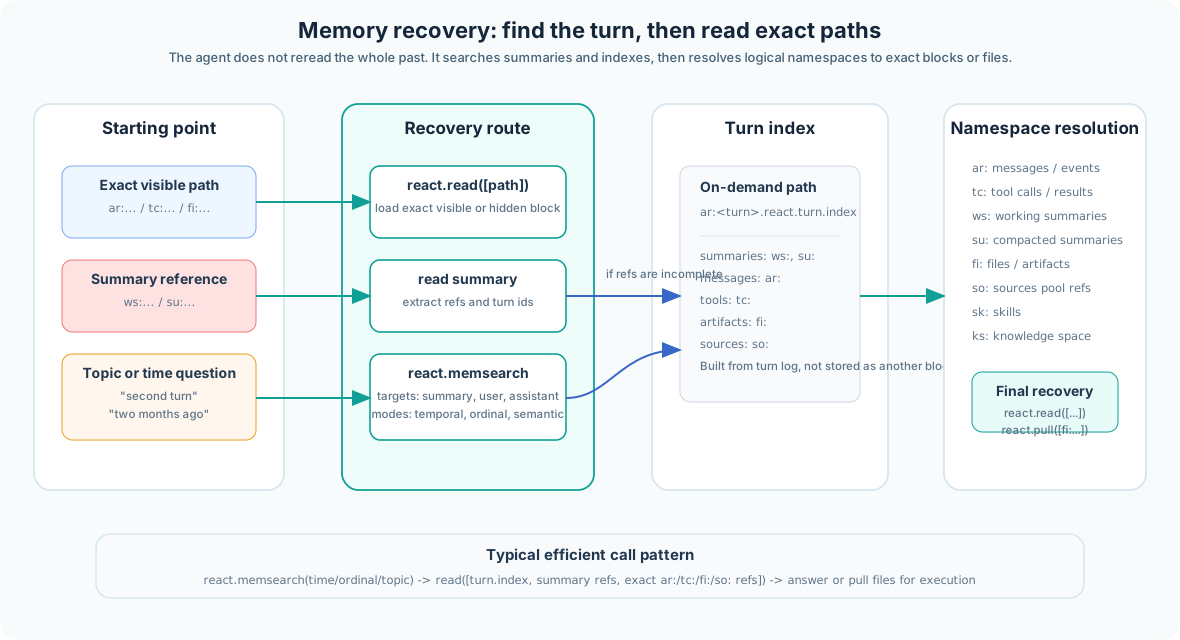
visible exact path
  -> react.read(paths=[path])
  -> react.pull(paths=[fi_path]) if execution needs a local file

visible summary path (conv:ws:/conv:su:)
  -> react.read(paths=[summary_path])
  -> react.read(paths=["conv:ar:conv_...turn_....react.turn.index"]) if refs are incomplete
  -> react.read(paths=[ar_or_tc_or_so_path, ...]) or react.pull(paths=[fi_path, ...])

topic only
  -> react.memsearch(query, targets=["summary", "user", "assistant", "attachment"])
  -> read the returned refs or the returned turn_index_path

broad conversation overview
  -> react.memsearch(mode="timeline", targets=["summary"], order="asc", top_k=N)
  -> summarize returned working summaries in turn order

ordinal clue
  -> react.memsearch(mode="ordinal", ordinal=2, targets=["summary", "user", "assistant"])

temporal clue
  -> react.memsearch(mode="temporal", from="2026-03-01T00:00:00Z", to="2026-04-01T00:00:00Z", targets=["summary", "user", "assistant"])
The qualified turn-index ref is not stored as another timeline block. It is reconstructed on demand from the persisted turn log and artifact metadata, and it lists the turn's summaries, messages, events, tools, artifacts, and sources with short semantic hints.
Citations & Sources
Citation Tokens
The company was founded in 2015 [[S:1]] and expanded by 2020 [[S:2,3]].
According to multiple sources [[S:1-4]], the trend is clear.
Sources Pool Fields
| Field | Description |
|---|---|
sid | Source ID (integer, per-conversation, deduplicated) |
title | Page or file title |
url | URL or file path |
source_type | web | file | attachment | manual |
objective_relevance | Semantic relevance score (0–1) |
published_time_iso | Publication timestamp |
favicon_url | Source favicon for UI display |
Feedback System
POST /conversations/{tenant}/{project}/{conv_id}/turns/{turn_id}/feedback

{ "reaction": "ok", "text": "Very helpful!", "ts": "2026-03-21T10:00:00Z" }
# reaction: ok | not_ok | neutral | null
Your app can also emit machine feedback (origin: "machine") for confidence scores or quality checks — additive, not replacing user feedback. Satisfaction rate: ok / (ok + not_ok + neutral).